
Cleaning Your Phone's Camera Lens?
Improper cleaning methods of your phone camera lens can harm protective coatings and degrade the quality of your photos. Discover the hidden risks, common mistakes, and safe cleaning techniques to protect your smartphone camera lenses.
Smartphone cameras are now a necessary part of our lives. We depend heavily on the small lenses located on the back of our phones for even the tiniest thing that happens in our life, be it capturing those family moments, scanning some documents, or creating professional content.
The majority of users are unaware that cleaning your phone camera lens inappropriately will quietly damage it and gradually worsen the image quality.
Why phone camera lenses are more fragile than you think?
Despite the fact that phone camera lenses appear to be simple pieces of glass. But they are much more complex. Most modern smartphone use:
- Multi-layer optical coatings to reduce the glare and reflections.
- Oleophobic coatings to keep fingerprints and oil away.
- No scratch-proof glass, but scratch-resistant glass.
These are incredibly thin layers. While they enhance the image quality, they are exposed to chemical damage.

The following are the common mistakes:
1. Using Cloths or Tissues
Although it might seem harmless to wipe your lens with a shirt, sleeve, or tissue, these fabrics often have tiny particles which are not seen. These lens’s surface can be gradually scratched by dust particles caught in the fabric, which function similarly to sandpaper.
These tiny scratchers eventually scatter light, which results in:
- Reduction of sharpness.
- Blurred and fuzzy images.
- Lens flare has increased.
2. Cleaning Too Frequently
It’s surprising that cleaning your camera lenses too often has more chances of doing harm than good. With every physical wipe, friction is introduced. Even if you are using soft materials, the repeated friction eventually weakens protective coatings.
If your camera appears good and images are clear, regular cleaning is not necessary.
3.Using Household Cleaners
Many people use glass cleaners, alcohol sprays, or disinfectant wipes on their phone lenses. These products are not designed for precision optics, but rather for household surfaces.
Chemicals can:
- Remove oleophobic coatings.
- Leave behind residue that affects the image clarity.
- Cause long-term cloudiness
Even diluted solutions can slowly degrade the lens surface.
4.Cleaning Without Removing Dust First
One of the fastest ways to create scratches is by rubbing a dusty lens without blowing off debris first. Dust particles, especially sand or grit, can be harder than glass itself.
Once scratched, the damage is permanent
Signs You May Have Already Damaged Your Lens
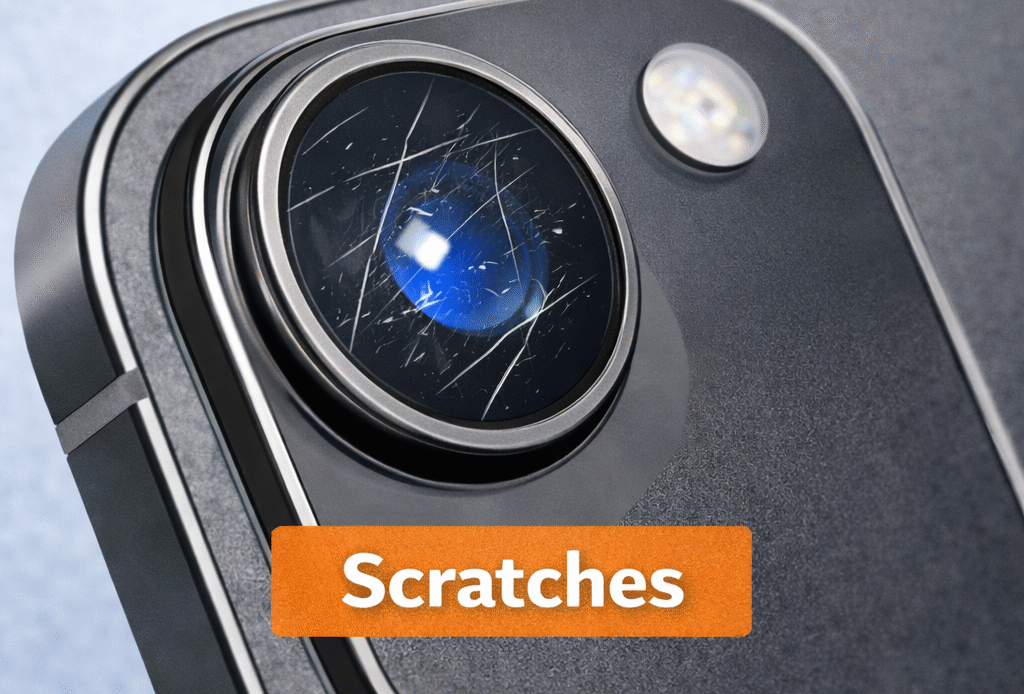
Lens damage doesn’t always look obvious. Watch for these subtle signs:
- Photos are not as sharp as before
- Images appear foggy or smeared even after cleaning
- Increased glare or strange light streaks
- Reduced contrast in bright areas.
Although users frequently blame the software or low light, the true issue here is physical lens wear.
How to Clean Your Phone Camera Lens Safely.
Take the following steps to lower the chance of damage:
1. To get rid of the loose dust, use a manual air blower or a gentle breath.
2. Use a microfiber cloth designed for eyeglasses or camera lenses.
3. Use as little force as possible and let the fabric do the work.
4. Avoid liquids unless necessary; if used, lightly dampen the cloth, not the lens
5. Don’t clean out of habit, do it only when necessary.
Preventive Measures Are Better Than Cleaning
The best way to protect your camera lens is to use the safety measures provided below:
Use a phone case with a raised camera lip
Avoid placing your phone camera-down on surfaces
Keep your phone in a clean pocket or pouch
Consider a tempered glass lens protector from a reputable brand
Frequently Asked Questions
Dust, fingerprints, and oil buildup can make photos look blurry, hazy, or less sharp. Cleaning improves clarity instantly.
If you use your phone daily, clean it 2–3 times a week or whenever photos start looking unclear.
It’s not recommended. Clothes can carry dust particles that may cause tiny scratches over time.
Plain water is not ideal. If needed, use a very small amount and dry immediately with a microfiber cloth.
Yes, if it contains strong chemicals or fragrances. Use only 70% isopropyl alcohol in small amounts.