
iPro Care

Are You Cleaning Your Phone Camera Lens the Wrong Way?

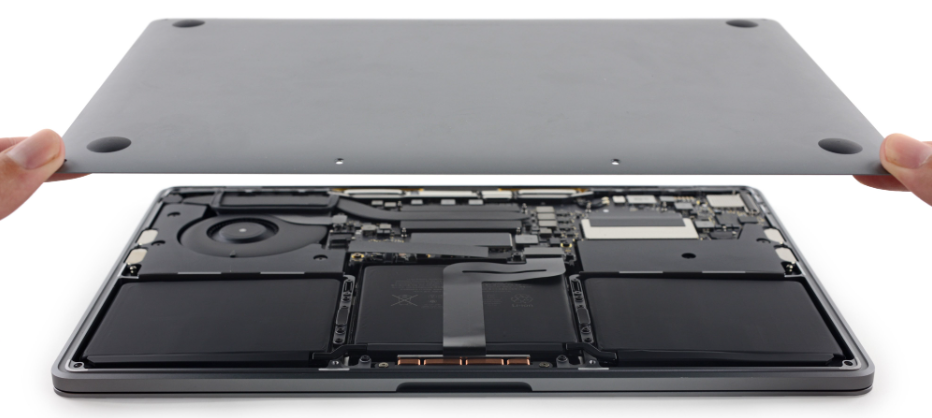
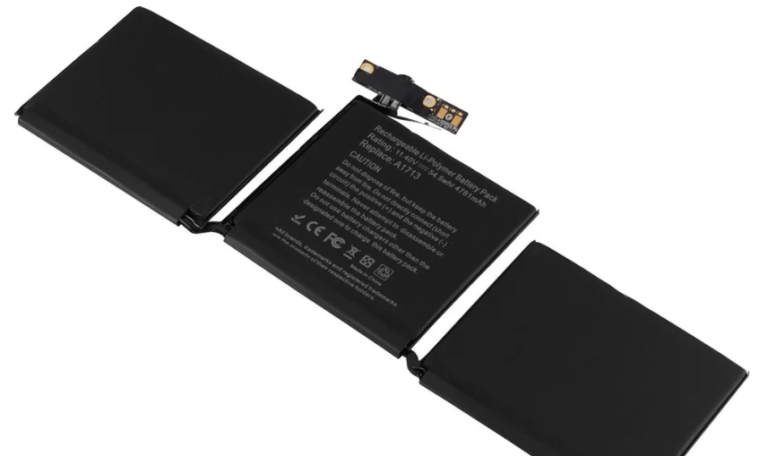
MacBook battery replacement is needed when your device drains quickly, overheats, or shuts down unexpectedly. Professional repair services can replace the battery safely, improving performance and extending your MacBook’s lifespan.

Battery Replacement

Is your MacBook not lasting as long as it used to? Battery issues are common in older devices and can significantly affect performance. If you’re searching for MacBook battery replacement, this guide will help you understand when to replace your battery and the best way to fix it quickly.

MacBook Battery Replacement

Signs You Need a MacBook Battery Replacement

Here are clear signs your battery needs attention:
  1. Battery drains very fast
  2. MacBook shuts down unexpectedly
  3. Device overheats during use
  4. Battery not charging properly
  5. “Service Battery” warning appears

If you notice these issues, it’s time to consider a MacBook battery replacement.

Why MacBook Batteries Wear Out

MacBook batteries degrade over time due to:
  1. Charge cycle limits
  2. Continuous heavy usage
  3. Overheating
  4. Using non-original chargers

Most MacBook batteries last around 2–4 years depending on usage.

Best Ways to Fix Battery Issues

1. Professional MacBook Battery Replacement.

The safest and most effective solution is choosing expert repair services.

Benefits:

  • High-quality battery replacement
  • Safe installation
  • Improved performance
  • Quick service

2. DIY Battery Replacement

Some users attempt replacing batteries themselves.

Risks include:

  • Internal damage
  • Safety hazards
  • Voiding warranty

3. Apple Authorized Service

Official services offer genuine batteries but may be more expensive and time-consuming.

How Long Does Battery Replacement Take?

Most professional MacBook battery replacement services take:
  1. 1–3 hours for standard models
  2. Same-day service in most cases

Quick repairs help minimize downtime.

Cost of MacBook Battery Replacement

The cost depends on:
  1. MacBook model
  2. Battery type
  3. Service provider

Third-party repair centers often provide affordable and reliable options.

Common Mistakes to Avoid

  1. Ignoring battery warning signs
  2. Using duplicate or low-quality batteries
  3. Overcharging your MacBook
  4. Delaying replacement too long

Avoiding these mistakes ensures better device performance.

How Long Does Battery Replacement Take?

MacBook Battery Replacement
  1. Avoid keeping your MacBook plugged in all the time
  2. Reduce screen brightness
  3. Close unused applications
  4. Keep your device cool
  5. Use original chargers

These habits reduce the need for frequent MacBook battery replacement.

A failing battery can slow down your entire workflow, but timely MacBook battery replacement can restore your device’s performance and reliability. While temporary fixes may help, professional repair is the best long-term solution.

A failing battery can significantly slow down your entire workflow, causing frequent interruptions, unexpected shutdowns, and reduced productivity. Over time, degraded battery health not only affects how long your MacBook lasts on a single charge but can also impact overall system performance. Opting for a timely MacBook battery replacement helps restore your device’s efficiency, stability, and reliability, allowing you to work without constant charging or performance issues.

While temporary fixes like adjusting settings or reducing usage may provide short-term relief, they do not solve the root problem. Professional repair ensures safe installation, high-quality components, and long-lasting results. Investing in a reliable battery replacement is a smart decision that extends your MacBook’s lifespan, improves performance, and keeps your device running smoothly for years to come

Phone cameras play a big role in daily life, from capturing memories to creating content and attending virtual meetings. Because we use them so often, it is common for lenses to collect dust, fingerprints, and smudges. While cleaning your phone camera lens seems simple, improper cleaning methods can cause hidden damage that affects photo quality and long term performance.

Table of Contents

Why Camera Lenses Need Proper Care

Modern smartphone camera lenses are built with special coatings that help improve image clarity, reduce glare, and protect against scratches. Using the wrong cleaning techniques or materials can damage these coatings, resulting in blurry photos, light distortion, or reduced image sharpness. Even small scratches can noticeably affect camera performance.

Common Mistakes People Make While Cleaning Camera Lenses

Many users unknowingly damage their lenses by using unsuitable materials or methods. Common mistakes include:

  • Using rough cloth, tissues, or clothing fabric
  • Applying excessive pressure while cleaning
  • Using harsh cleaning liquids or chemicals
  • Cleaning with dirty or dusty materials
  • Attempting to remove particles with sharp objects

These habits may seem harmless but can lead to permanent lens damage over time.

Hidden Risks of Improper Cleaning

Improper cleaning can cause micro scratches, damage protective coatings, or push dust deeper around the lens area. In some cases, moisture or liquid cleaners may enter the camera module and affect internal components. Once this happens, photos may appear blurry, foggy, or lose focus accuracy, leading to a noticeable drop in camera quality.

Safe Ways to Clean Your Phone Camera Lens

To clean your camera safely:

  • Use a soft microfiber cloth
  • Gently wipe in circular motions
  • Avoid spraying liquid directly on the lens
  • Keep the lens dry and free from dust
  • Clean regularly but gently

Following these simple steps helps maintain image clarity without risking damage.

What to Do If Your Camera Lens Is Scratched or Damaged

If you notice scratches, cracks, blurry images, focus issues, or unusual camera behavior, it may indicate lens damage rather than simple dirt buildup. In such cases, trying to fix it at home can sometimes make the problem worse.

At iPro Care, our technicians carefully inspect camera lens issues to identify whether the problem is external damage or internal camera module faults. We provide professional solutions including lens replacement, camera module repair, and precise testing to restore image clarity and performance. With proper tools and expert handling, iPro Care ensures your phone camera works the way it was designed to.

Signs Your Camera Lens May Need Professional Attention

Sometimes lens damage is not immediately obvious. If your photos appear blurry, focus takes longer than usual, images look foggy, or you notice small spots that do not disappear after cleaning, these may be signs of lens or camera module damage. Getting the issue checked early can prevent further problems and help maintain photo quality.

Keep Your Camera Performing Like New

Your phone camera is one of the most used features of your device, and proper care helps maintain clear, sharp images for longer. Using safe cleaning methods, avoiding unnecessary pressure, and seeking expert help when needed can protect your camera from long term damage and ensure consistent performance.

Enquire About Your Repair

Leave Us Your Details & We Will Call You