
Most people only start thinking about their Mac battery when it becomes a problem. At first, it lasts all afternoon; then, almost without warning, it barely survives a meeting. Because this decline happens gradually, it often sneaks up on you, which is why it feels sudden and frustrating when the battery finally gets bad. The truth is simple: batteries don’t last forever. Over time, they wear out, and when that happens, replacing the battery can make your Mac feel normal again. You don’t suddenly get a brand-new machine, but you do regain the reliability and peace of mind you’ve been missing.
If you’re unsure where to go, choosing the right service provider matters. For that reason, this guide on finding a trustworthy MacBook repair shop in Bangalore can help you avoid low-quality services and unnecessary risks. So what actually happens when you book a battery replacement service, and why is it worth doing?
What a battery replacement service really includes
A proper service doesn’t start with swapping parts. It starts with a check.
The technician begins by checking your battery health, charge cycles, and system warnings. This step matters because, in some cases, the issue isn’t the battery at all. Instead, it could be software-related, a faulty charger, or even a damaged charging port. For that reason, a good repair shop confirms the real problem before touching anything, which alone can save you unnecessary expense.
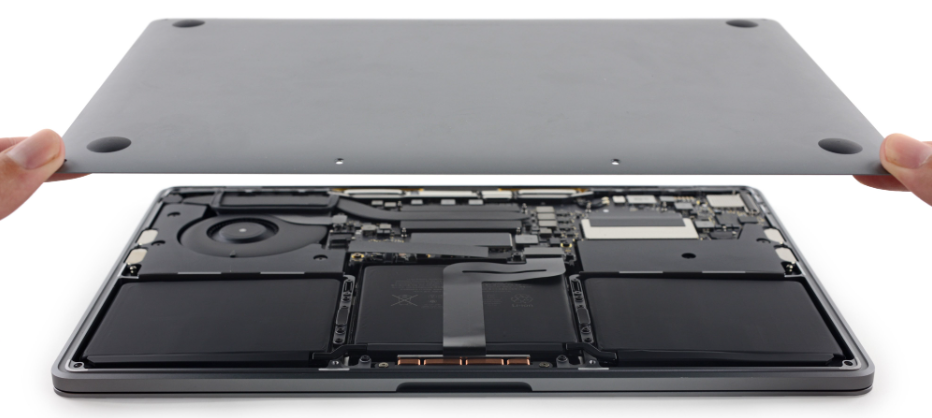
Once it’s clear the battery needs replacing, the Mac is opened. Newer models, however, are sealed tightly, with batteries glued in and surrounded by delicate cables and components. Because of this, the process shouldn’t be rushed. One wrong move can cause damage that ends up costing far more than a simple battery replacement.
Next, the old battery is removed carefully. If it’s swollen, extra precautions are taken, since damaged batteries can be dangerous. They may leak, overheat, or, in rare cases, even catch fire. That’s why professionals take their time during this stage of the repair.
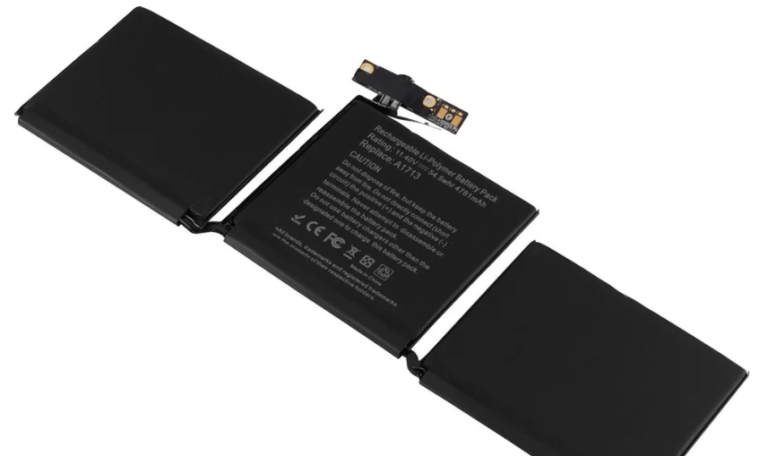
Then the new one goes in. A proper service uses quality replacement batteries, not cheap parts that fail after a few months. This part matters more than people think. A low-quality battery can swell again, drain fast, or even damage your Mac internally.
After installation, the Mac is tested properly. Charging speed, temperature, battery percentage accuracy – all checked before you get it back. If something doesn’t look right, it’s fixed on the spot instead of being passed on to you as a future problem.
That’s what you’re paying for:
experience, proper tools, safe handling, and peace of mind.
Why replacing your battery actually matters
A weak battery doesn’t just shorten your screen time. It can affect performance too.
When macOS senses unstable power, it can slow things down to protect the system. That’s why your Mac might feel sluggish lately. It’s not age — it’s the battery. Many people think their laptop is “getting old” when it’s really just struggling with power delivery.
With a new battery, you’ll notice:
- Longer unplugged use
- No random shutdowns
- Smoother performance
- Less heat
- No anxiety over battery percentage
You stop planning your day around power outlets, which is honestly underrated. Being able to work freely without hunting for a socket feels like a small upgrade, but it makes a big difference.
Signs your Mac battery needs replacing
If any of these sound familiar, your battery is probably done:
Battery drains unusually fast
Mac shuts down at 20–30%
“Service Recommended” message
Laptop feels hot
Trackpad feels stiff or raised
That last one is serious. A swollen battery pushes from inside and can damage your Mac. It can crack the trackpad, affect the keyboard, or even damage the screen. Don’t ignore it.
Apple vs local repair shops
Apple service is reliable, but it’s usually more expensive and can take longer. Sometimes you’ll be without your laptop for days. Local repair shops can be just as good if you choose wisely. Many offer same-day service, lower prices, and solid warranties. Just check reviews and ask what parts they use. A good shop will be upfront and won’t pressure you.
Is it worth doing?
If your Mac still works well for what you use it for, then yes — absolutely.
Replacing a battery costs much less than buying a new laptop. You’re basically giving your Mac a second life instead of throwing away a perfectly good machine. It’s better for your wallet and better for the environment too.
If cost is a concern, there are affordable MacBook repair options in Bangalore that offer quality service without overcharging.
A Mac battery replacement won’t turn your laptop into the latest model, but it will make it reliable again. And for most people, that’s all they really want.
No more panic when it hits 10%.
No more carrying chargers everywhere.
Just a Mac that works when you need it.
Sometimes the smartest upgrade isn’t a new device.
It’s a fresh battery.
Frequently Asked Questions
Why should I choose iPro for Apple battery replacement?
iPro specializes in Apple device repairs and uses high-quality replacement batteries that meet Apple performance standards. You get reliable service, fair pricing, and expert technicians—all in one place.
Are the replacement batteries used by iPro original or high quality?
iPro uses premium-grade batteries that are fully compatible with Apple devices, ensuring long battery life, safety, and stable performance.
How long does an Apple battery replacement take at iPro?
Most battery replacements are completed within 30–60 minutes, depending on the device model. No long waiting times.
Is iPro battery replacement affordable?
Yes. iPro offers cost-effective pricing compared to authorized service centers, without compromising on quality or safety.
Does iPro provide warranty on battery replacement?
Yes. iPro provides a warranty on the replaced battery, giving you peace of mind after the service.